
Edit Post option
If you’re doing it from the Edit Post view, make sure that you have “Discussion” selected under screen options at the top of the page.

Then scroll down to edit comment options.

Quick Edit option
The quick edit view is available on the All Posts view. You may have to hover just below the post title to see the options.

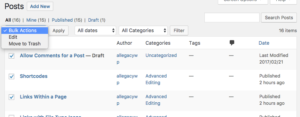
Bulk Edit Option
To edit many posts at once, you can select them using the checkboxes to the far left on the All Posts view, and then use the dropdowns at the top of the posts to select “Bulk Actions->Edit” and then press “Apply.” When you are done with your changes, but sure to click “Update”.
 Print This Post